Reduce panel and scheduling demands
Deliver the approved online portions without bringing the same panel together for every candidate. Reduce repeated staffing, overtime, backfill, travel, and facility demands.
Product
Platform OverviewAssessment ModulesHow It WorksDepartment ControlReporting & ReviewSecurity & IntegritySolutions
New-Hire AssessmentPromotional AssessmentClinical ClearanceReturn to PracticeContinuing CompetencyCustom AssessmentsEMS assessment operations for fire departments
Written tests, clinical scenarios, and structured oral questions in one department-controlled online assessment. Candidates demonstrate their knowledge and reasoning. Your evaluators receive connected evidence and professional reports.
See the experience
A patient encounter gives candidates room to demonstrate clinical reasoning and communication. Watch the candidate introduce himself, acknowledge concern, listen, and follow up. See requested vital signs and a 12-lead ECG appear for review. Then see how the department reviews the whole assessment cohort.
Illustrative encounter · AI-generated actors and scripted dialogue · Staged sample findings in the actual candidate interface · Actual dashboard with fictional data
MedicReady lets departments assess more than what a paramedic knows. It helps them see how that paramedic thinks and communicates.
Illustrative encounter: Robert, 62. The following dialogue is scripted and uses AI-generated actors.
Candidate: “Hi, Mr. Miller. I’m Alex, a paramedic. I’m here to help. Can you tell me what you’re feeling?” Patient: “I’ve got this pressure in my chest, and I feel kind of sick.”
Candidate: “I can see this is worrying you. We’ll take it one step at a time. When did the pressure start?” Patient: “About thirty-five minutes ago. I was carrying boxes downstairs.”
Candidate: “Thank you. Does the pressure move anywhere else? And how bad is it, from zero to ten?” Patient: “A little into my left arm. It’s about a seven out of ten.”
Candidate: “I hear you. I’ll explain what I’m doing as we go.” Patient: “Okay. Thank you.”
Candidate: “Mr. Miller, I’m going to check your blood pressure and other vital signs. Can I have his current vital signs, please? I’d also like to obtain a twelve-lead ECG. I’ll explain each step as we go.”
The encounter goes beyond conversation. When the candidate asks for available findings, MedicReady displays the information for review. Blood pressure and other vital signs appear on screen. A requested twelve-lead ECG can be enlarged for a closer look. The candidate must interpret the findings and decide what to do next.
This gives evaluators a way to examine history-taking, communication, and clinical reasoning alongside written knowledge. For the department, the results dashboard brings candidates from the same assessment into one review workspace. See report readiness, overall and component scores, critical observations, and technical issues. Review cohort trends, then open an individual candidate when you need supporting evidence. The sample dashboard uses fictional candidates and scores.
From that overview, move into a candidate’s report. Results stay connected to the approved assessment framework, supporting evidence, reviewer notes, and department decisions. Your department defines the clinical content and evaluation criteria. Your evaluators review the record and make the decisions. MedicReady brings realistic patient interaction, structured assessment, and a connected review process together, while reducing repeated panel coordination and manual report assembly.
A clear introduction, acknowledgment of concern, listening, and follow-up questions within the patient encounter.
Vital signs and a 12-lead ECG appear for review; the ECG can be enlarged.
Candidate results, component scores, report readiness, and review needs in one workspace.
Move into an individual candidate’s record for supporting detail and human review.
The department’s view
Review the cohort, see performance across the selected components, identify records that need attention, and open one candidate’s report for supporting evidence.
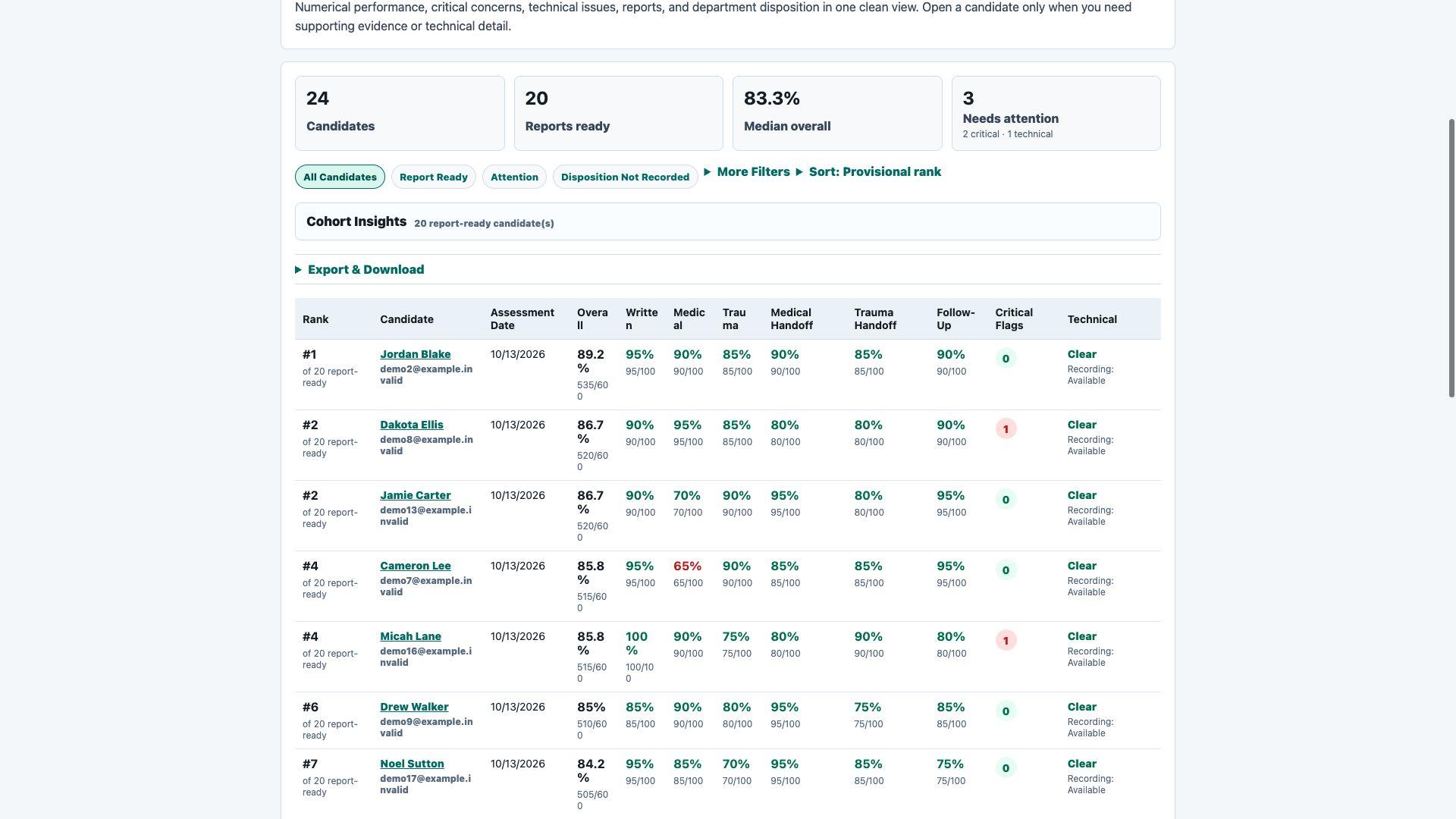
Actual results interface · Fictional demonstration department, candidates, and scores · Technical limitations remain separate from performance results
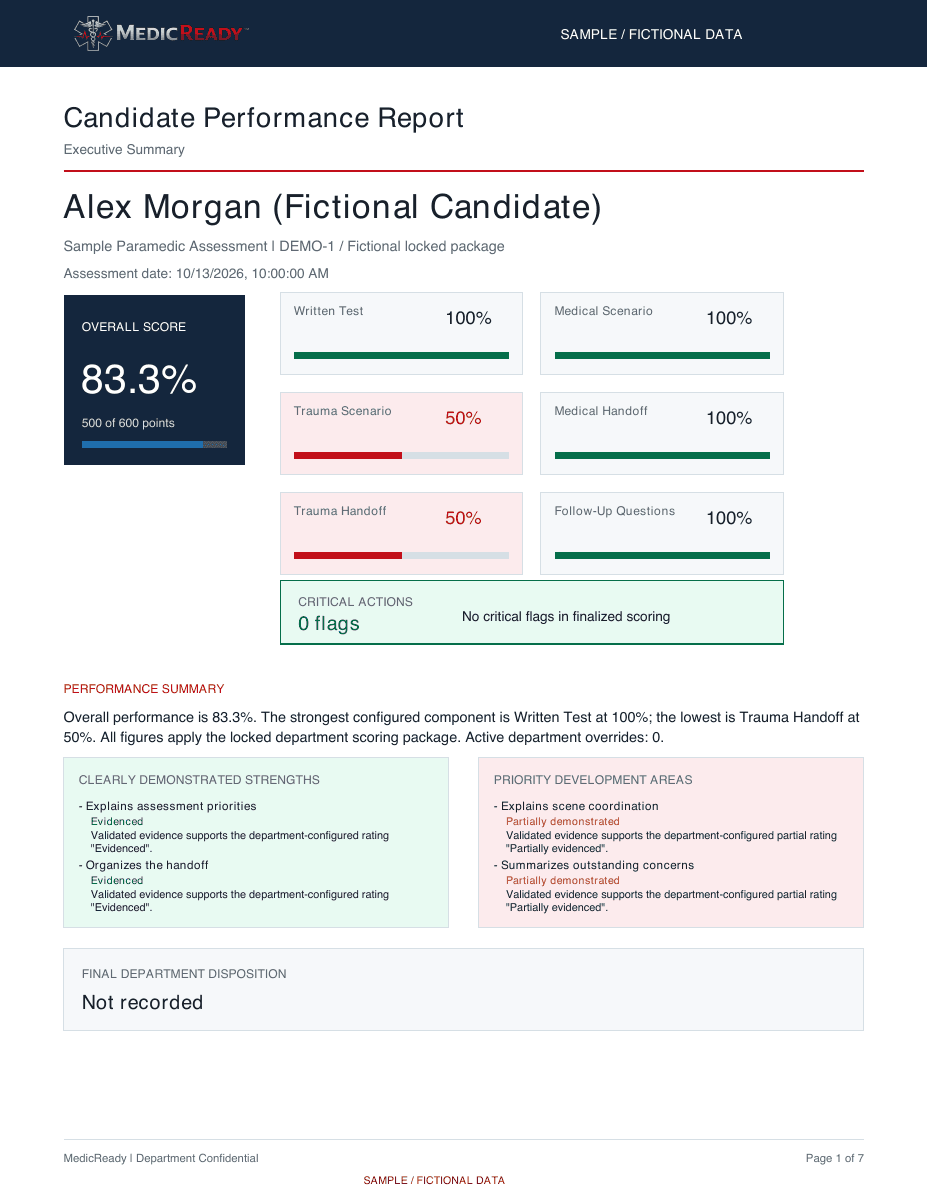
Evidence you can inspect
See the department-facing output. Results stay connected to the approved assessment, supporting evidence, and human review.
PDF · No login required · Fictional candidate and evidence · Generated with the existing MedicReady reporting engine; final V2 export to replace this draft sample
Your department defines the criteria. Authorized people review the evidence and make the decisions.
Operational value
Deliver the approved online portions without bringing the same panel together for every candidate. Reduce repeated staffing, overtime, backfill, travel, and facility demands.
Candidates assigned to the same published version follow the same approved assessment rules. Evaluators review their evidence against the same department-defined criteria.
Bring responses, available recordings and transcripts, ratings, and department review into one record instead of assembling separate sheets and files afterward.
Assessment in practice
A large metro fire department used MedicReady for 104 lateral paramedic applicants. Candidates scoring 80% or higher on the written assessment advanced to the practical portion.
Use case: lateral paramedic applicant screening.
Who it serves
Give each applicant the same approved process and review clear numerical results before making a hiring decision.
Verify clinical knowledge and decision-making on a recurring schedule, then use department trends to focus training where it is needed most.
Run a consistent, documented process with reviewable evidence and department-controlled scoring standards.
How it works
Set the content, scoring rules, thresholds, and report requirements your department approves.
Assign the assessment and let candidates complete it within the department’s approved window.
Candidates move through the written, scenario, handoff, and follow-up sections your department selected.
See numerical scores, critical observations, supporting evidence, recordings when configured, and a completed professional report.
Integrity and fairness
MedicReady is designed to document the assessment without replacing human judgment.
Authorized reviewers can return to protected session recordings during the department’s retention period.
Activity may be marked for review, but no automated observation fails a candidate or determines misconduct.
Candidates receive notice before recording or automated review begins. Recordings are protected and automatically deleted on schedule.
A person reviews the evidence and the department makes every hiring, competency, promotional, and integrity decision.
Bring one assessment or your full evaluation program. We will show you the candidate experience, department dashboard, evidence, and finished reports.
Meet the MedicReady Guide
MedicReady helps departments run structured, department-controlled assessment workflows. Select the Guide to ask questions and hear answers in a natural conversation.
Topics you can explore
The MedicReady Guide is an AI product guide, not an evaluator, clinician, hiring authority, decision-maker, or human. It will say when approved public information does not answer a question.
AI MedicReady Guide
Microphone used only after you start · Camera not required · No recording or persistent visitor memory · Do not share sensitive information